
Watch the 30-second walkthrough
The video covers the full flow in four clicks. The rest of this guide explains the rules behind it and gives you 85 patterns, each one tested against Google's RE2 engine before publishing, so you can paste them straight into Search Console.
What is regex in Google Search Console?
A regular expression (regex) is a short text pattern that describes a set of strings. In Google Search Console, regex lets you filter the Performance report by patterns instead of single words: every question query, every misspelling of your brand, every URL in a folder, or everything except those things.
Google added regex filters to the Performance report in April 2021. In its launch post, Google used the example of a company called "cats and dogs" that people also search as "cats & dogs" or "c&d": one filter, cats and dogs|cats & dogs|c&d, captures every branded query at once. In June 2021 Google added the negative option, Doesn't match regex, so you can exclude a pattern as easily as include it.
Regex works on two dimensions in the Search results Performance report:
- Query: the search terms people typed, such as
best seo company in dubai
. - Page: the full URL that appeared in Google, such as
https://example.ae/blog/local-seo
.
Country, Device, Search appearance and Date filters do not accept regex. For those you use the normal dropdowns, and you can combine them with a regex Query or Page filter.
How to use a regex filter in Search Console, step by step
- Open the Performance report. In Search Console, choose your property, then go to Performance > Search results. Set the date range you want to analyse (up to 16 months of data is available).
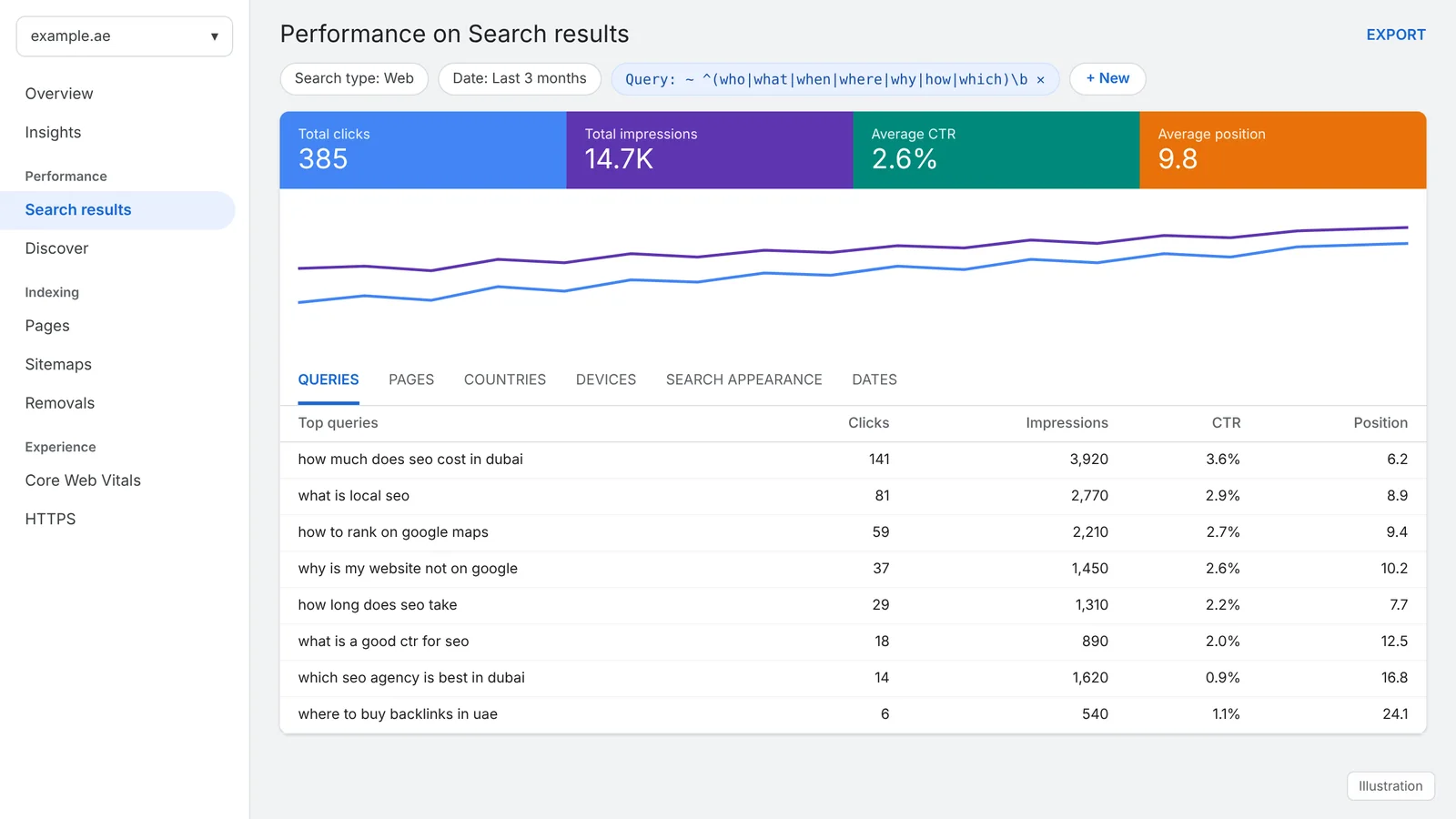
- Click + New in the filter bar. It sits next to the Search type and Date chips at the top of the report.
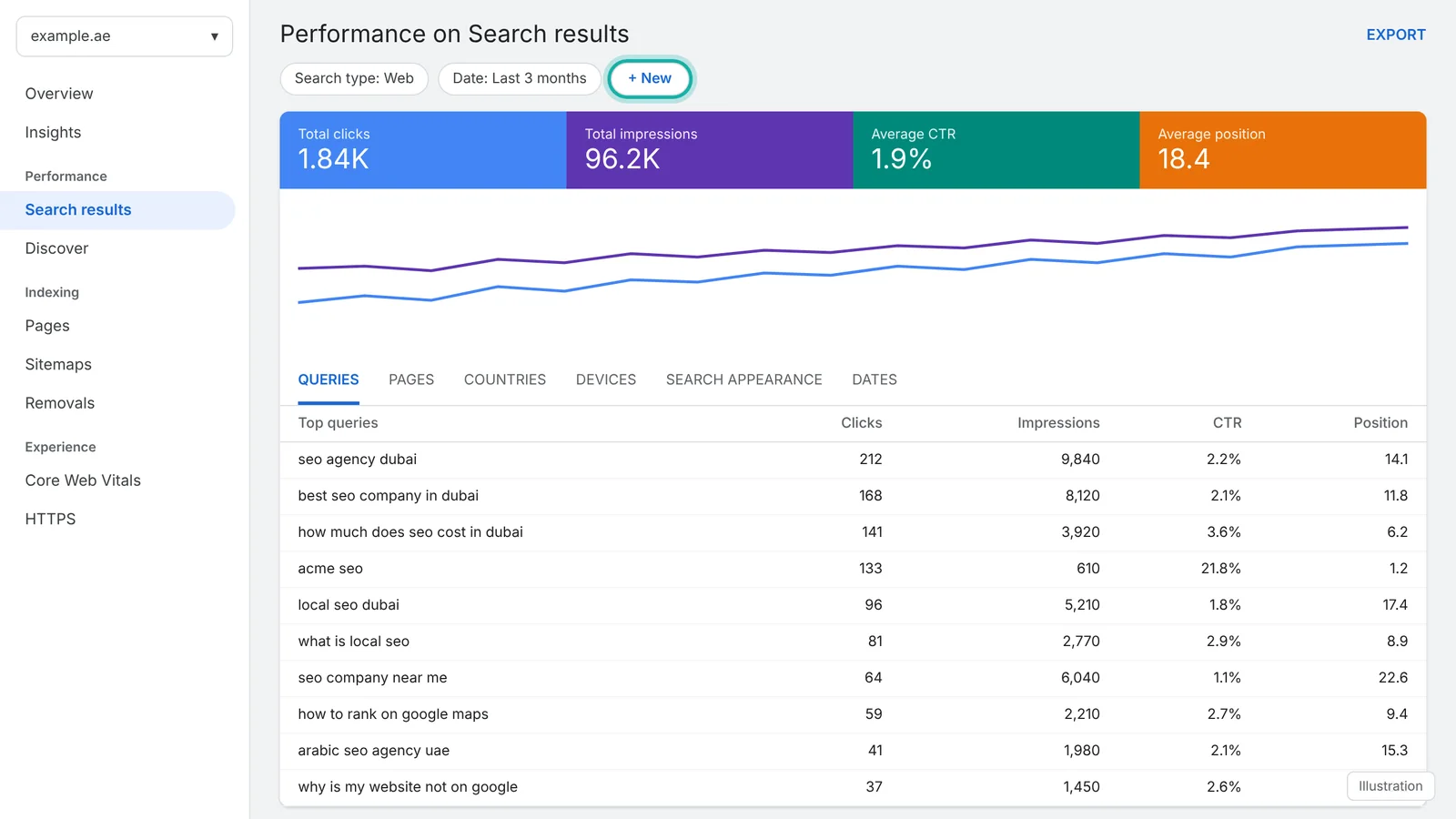
- Choose Query or Page. Query filters search terms. Page filters URLs.
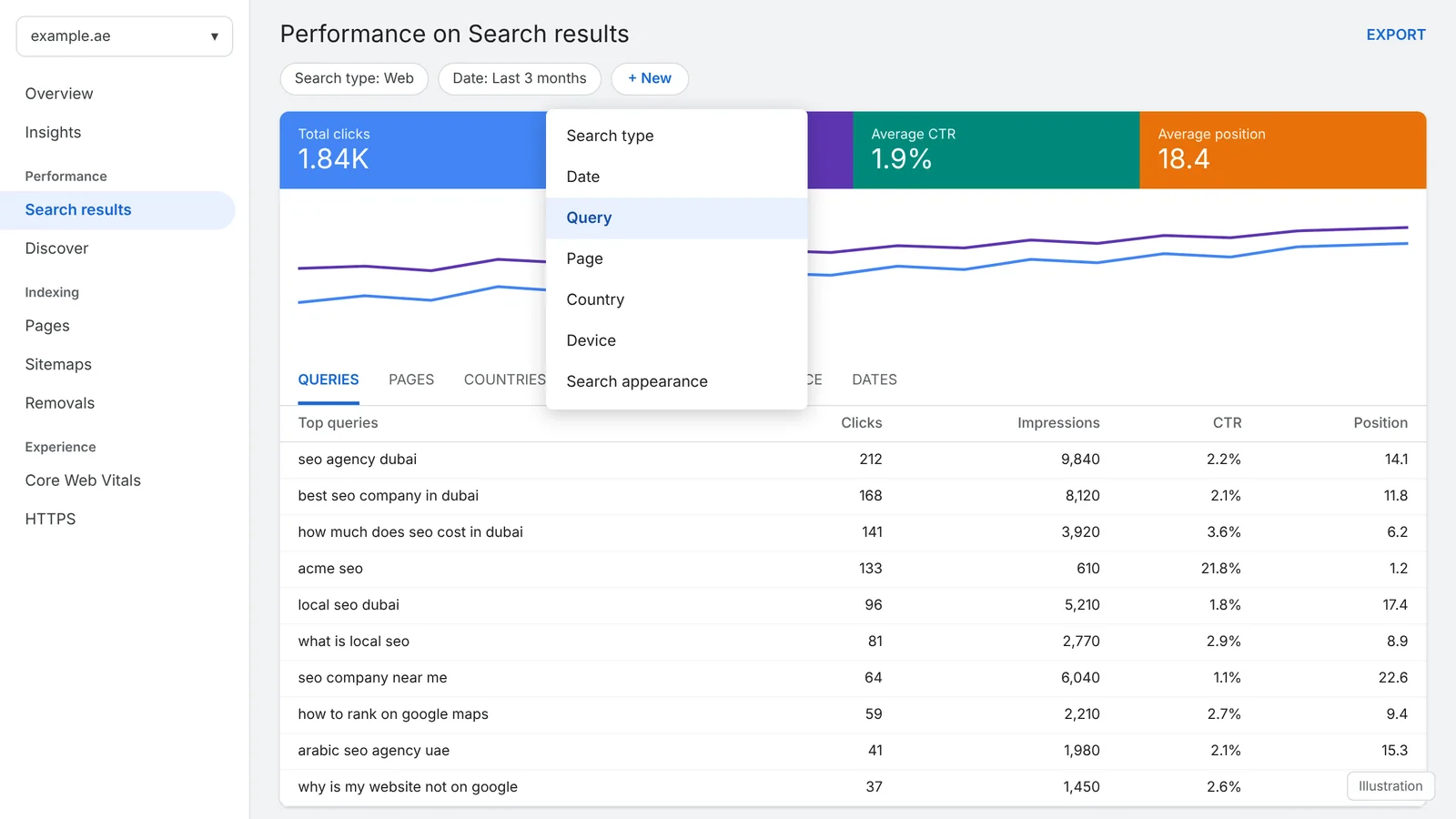
- Select Custom (regex) from the dropdown. The default options are "containing", "not containing" and "exact". Custom (regex) is the fourth option.
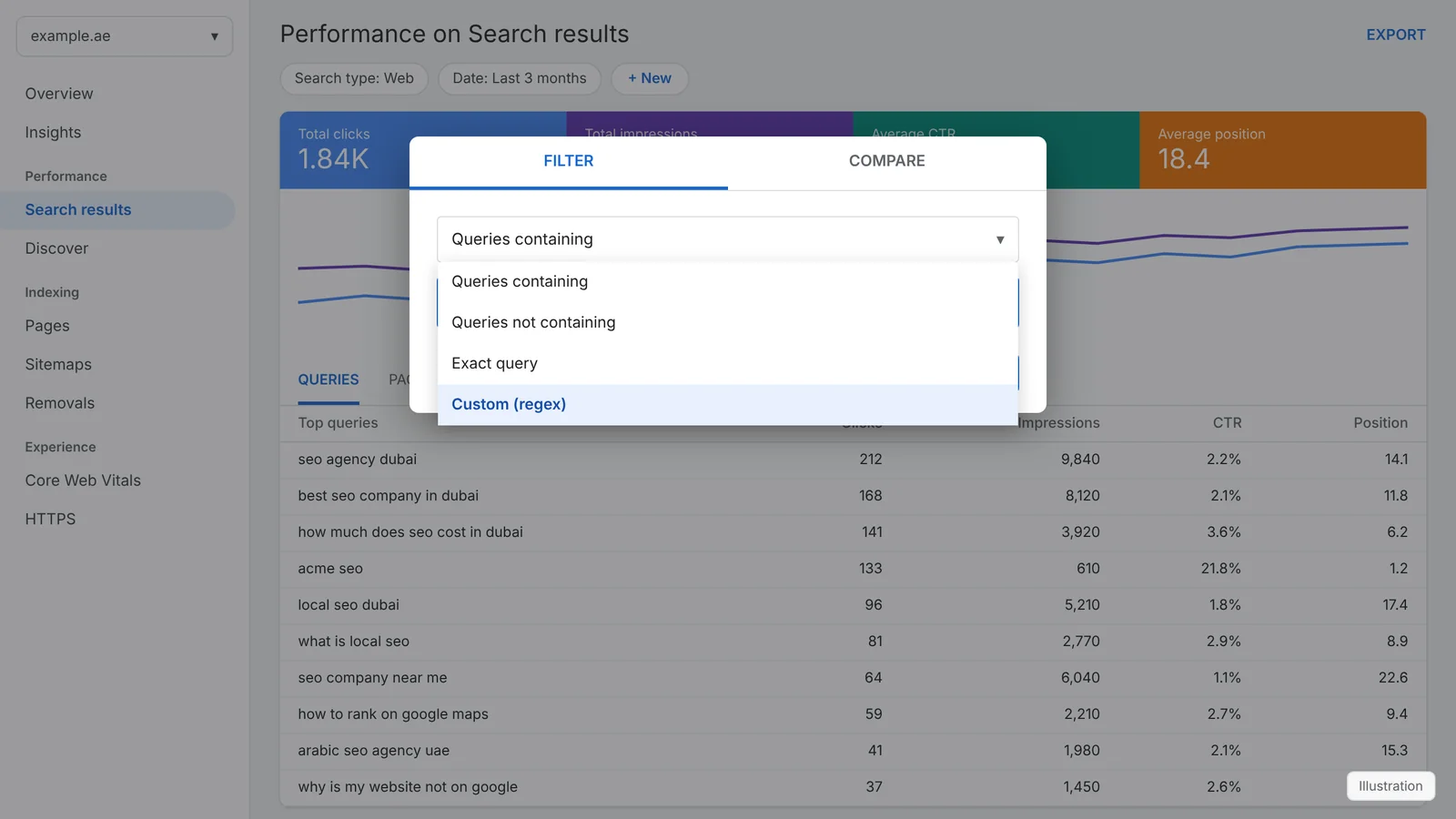
- Choose Matches regex or Doesn't match regex, then type your pattern. A second dropdown appears once Custom (regex) is selected.
- Click Apply. The filter appears as a chip in the filter bar. Click the chip to edit it, or the cross to remove it.
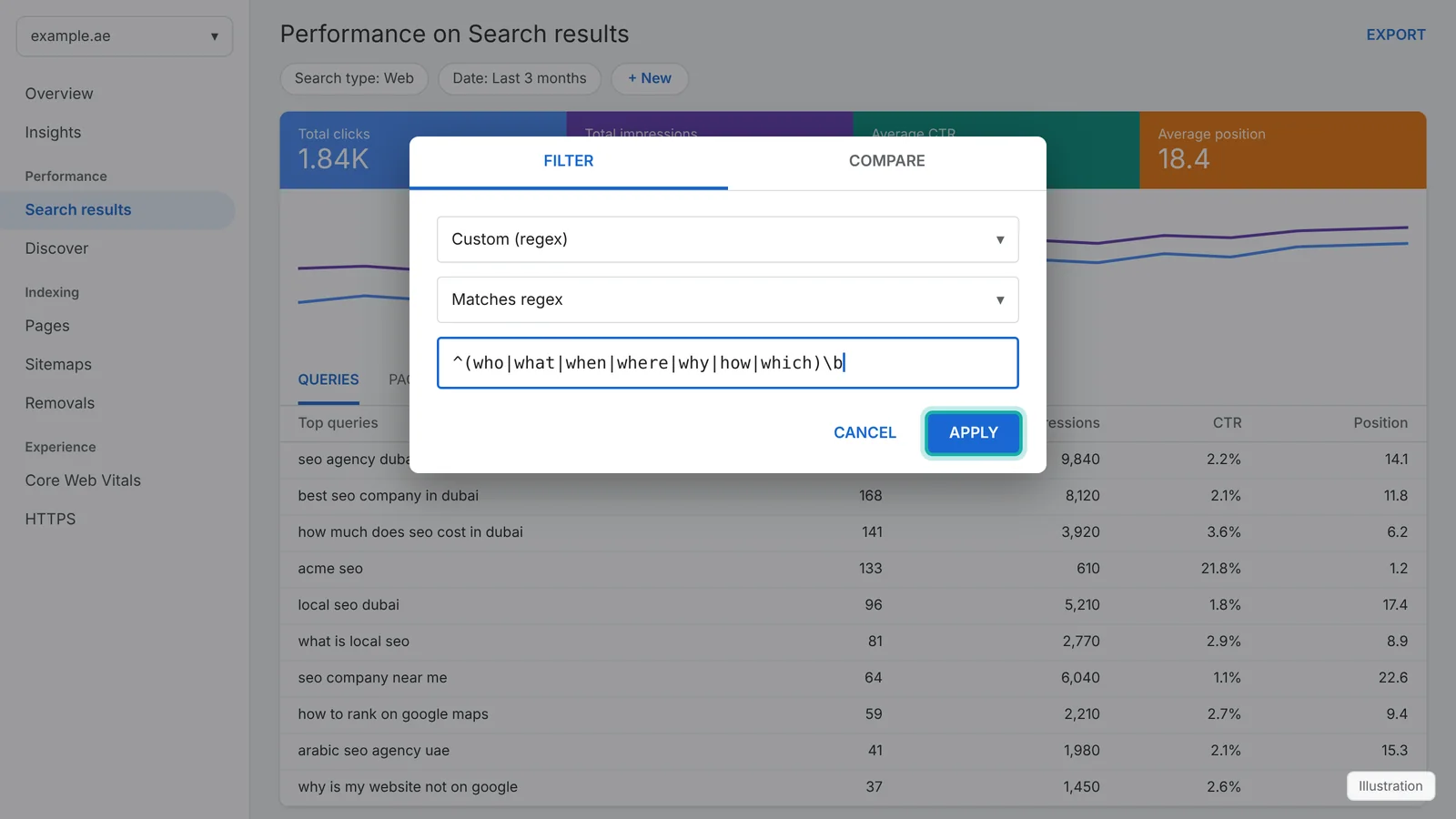
Tip: you can stack several filters. Two Query filters work as AND (both must be true), while the pipe character | inside one pattern works as OR.
The RE2 rules that decide whether your regex works
Search Console uses RE2, the regular expression library Google built for speed and safety. RE2 is also used by Google Analytics 4, Looker Studio and the REGEXMATCH function in Google Sheets, so patterns you write here carry over. It differs from the regex in Python, JavaScript or PHP in a few ways that catch people out.
Partial match by default
A pattern matches anywhere in the string. seo matches local seo dubai
. Use ^ to anchor the start and $ to anchor the end.
Set case behaviour explicitly
Google's documentation has described the default case handling differently over the years. Query data is stored in lowercase, so case mostly matters for Page URLs. Start with (?i) for case-insensitive or (?-i) for case-sensitive and you get the same result whatever the default is.
No lookarounds or backreferences
RE2 rejects (?=…), (?!…), (?<=…), (?<!…) and \1. Use a second filter or the Doesn't match regex option instead. We tested this: all five fail in RE2.
Broken patterns fail silently
An invalid regex does not show an error. The report simply returns no rows, which looks exactly like a valid pattern with no matches. If a filter comes back empty, check the syntax first.
Escape special characters
These characters have special meaning: . * + ? ^ $ ( ) [ ] { } | \. To match them literally, add a backslash: example\.ae, \?, \+.
Mind the length limit
Each filter accepts roughly 4,096 characters. Long brand-misspelling lists can hit it. Group shared parts with parentheses, for example acme(seo|digital|agency), to keep patterns short.
Regex cheat sheet for Search Console
These are the RE2 building blocks you will use in nearly every Search Console filter.
| Symbol | Meaning | Example | Matches |
|---|---|---|---|
| | OR: either side | dubai|sharjah | seo dubai, seo sharjah |
^ | Start of the string | ^how | how to rank (not "seo how to") |
$ | End of the string | near me$ | dentist near me |
. | Any single character | s.o | seo, s3o |
* | Zero or more of the previous item | seo.*dubai | seo agency in dubai |
+ | One or more of the previous item | \d+ | 7, 2026 |
? | Optional: zero or one | colou?r | color, colour |
( ) | Group items together | seo (agency|company) | seo agency, seo company |
[ ] | Any one character from a set | [0-9] | any digit |
[^ ] | Any character not in the set | [^/]+ | one URL segment |
{n,m} | Between n and m repetitions | \d{4,} | 10452 |
\d | Any digit | top \d+ | top 10 |
\s / \S | Whitespace / non-whitespace | ^\S+$ | one-word queries |
\w | Letter, digit or underscore (ASCII) | \w+ | seo_2026 |
\b | Word boundary (ASCII words) | \bseo\b | seo, but not seoul |
\p{Arabic} | Any character in a Unicode script | \p{Arabic} | سيو دبي |
(?i) | Case-insensitive from here on | (?i)acme | Acme, ACME |
\ | Escape a special character | \.pdf$ | /price-list.pdf |
Note that \b and \w only understand ASCII letters in RE2. For Arabic and other scripts, match the words directly or use Unicode classes such as \p{Arabic}.
Anatomy of a Search Console regex
Here is one pattern broken into its parts. It finds question queries that mention Dubai anywhere after the question word:
- ^
- Start of the query, so the question word must come first
- (how|what|which)
- A group of alternatives: any one of the three words
- \b
- Word boundary, so "however" and "whatsapp" do not match
- .*
- Any characters, any number of times
- dubai
- The literal word that must appear later in the query
It matches how much does seo cost in dubai
and which seo company is best in dubai
, but not seo dubai how to
.
85 copy-paste regex patterns for Search Console
Every pattern below was compiled and tested with Google's RE2 library against a matching and a non-matching example before publishing. Click Copy, paste it into a Custom (regex) filter and replace the example brand (acme
) or domain (example.ae
) with your own.
Branded and non-branded queries
Group every spelling of your brand so you can separate demand you already own from demand you still have to win. Run the same pattern with Doesn't match regex to see non-branded traffic only.
| Regex | What it finds |
|---|---|
acme | Any query containing your brand nameMatches: acme seo dubaiQuery · Matches regex |
acme|akme|acmee|ac me | Brand plus common misspellings and spacingMatches: akme reviewsQuery · Matches regex |
(?i)top ?seo ?agency | Brand written with or without spaces, any caseMatches: topseoagencyQuery · Matches regex |
acme|akme|acmee | Non-branded traffic only (use Doesn't match regex)Keeps: seo agency dubaiQuery · Doesn't match regex |
^acme$ | Only the bare brand search, nothing elseMatches: acmeQuery · Matches regex |
acme.*(review|reviews|complaint|scam|legit) | Reputation searches about your brandMatches: acme reviews 2026Query · Matches regex |
acme.*(login|sign in|account|portal) | Existing customers trying to log inMatches: acme loginQuery · Matches regex |
(semrush|ahrefs|moz) | Competitor brand names your pages appear forMatches: ahrefs alternativeQuery · Matches regex |
Question queries (for content, AEO and AI Overviews)
Question queries tell you exactly what to answer on the page. They are also the queries most likely to trigger featured snippets, People Also Ask boxes and AI Overviews.
| Regex | What it finds |
|---|---|
^(who|what|when|where|why|how|which|whose|whom)\b | Queries that start with a question wordMatches: how to rank on google mapsQuery · Matches regex |
\b(who|what|when|where|why|how|which)\b | Question words anywhere in the queryMatches: seo cost how muchQuery · Matches regex |
^(is|are|can|does|do|should|will|could|would|did|has|have)\b | Yes or no questionsMatches: is seo worth itQuery · Matches regex |
^(how to|how do i|how can i|how much|how long|how many)\b | How-to, cost and duration questionsMatches: how much does seo costQuery · Matches regex |
\?$ | Queries typed with a question markMatches: what is seo?Query · Matches regex |
\b(vs|versus|or|compared to|difference between)\b | Comparison questionsMatches: seo vs google adsQuery · Matches regex |
^(what is|what are|what does|meaning of|define|definition)\b | Definition queries for glossary contentMatches: what is a canonical tagQuery · Matches regex |
(ماذا|كيف|لماذا|متى|أين|هل|ما هو|ما هي|كم) | Arabic question words (UAE and GCC sites)Matches: كيف اظهر في خرائط جوجلQuery · Matches regex |
Search intent
Search intent decides which page should rank. These patterns sort queries into commercial, transactional, informational, local and navigational buckets.
| Regex | What it finds |
|---|---|
\b(best|top|leading|recommended|trusted|rated)\b | Commercial investigation: shoppers comparing optionsMatches: best seo company in dubaiQuery · Matches regex |
\b(price|prices|pricing|cost|costs|fee|fees|rate|rates|package|packages|quote)\b | Price-sensitive queriesMatches: seo packages dubaiQuery · Matches regex |
\b(cheap|affordable|budget|low cost|discount|deal|offer)\b | Budget buyersMatches: affordable seo servicesQuery · Matches regex |
\b(buy|order|hire|book|get|subscribe|sign up|quote)\b | Transactional: ready to actMatches: hire seo expertQuery · Matches regex |
\b(agency|company|companies|firm|services|service|consultant|expert|specialist)\b | Provider searches for service businessesMatches: seo consultant abu dhabiQuery · Matches regex |
\b(guide|tutorial|tips|ideas|examples|checklist|template|learn|course)\b | Informational: learning and researchMatches: local seo checklistQuery · Matches regex |
\b(free|diy|yourself|tool|tools|generator|checker)\b | Free and DIY intent (often low conversion)Matches: free seo checkerQuery · Matches regex |
\b(near me|nearby|near by|close to me|around me|open now)\b | "Near me" and local intentMatches: seo agency near meQuery · Matches regex |
\b(jobs?|careers?|vacancy|vacancies|hiring|salary|internship|cv)\b | Job seekers, usually excluded from SEO reportsMatches: seo jobs dubaiQuery · Matches regex |
\b(login|log in|sign in|contact|phone|number|address|whatsapp|email)\b | Navigational and contact searchesMatches: acme phone numberQuery · Matches regex |
Local SEO and locations (UAE examples)
Location modifiers show where demand comes from and which areas need their own landing page. Swap the place names for your own market.
| Regex | What it finds |
|---|---|
\b(dubai|abu dhabi|sharjah|ajman|ras al khaimah|rak|fujairah|umm al quwain|uae|emirates)\b | Any UAE emirate or the countryMatches: seo company sharjahQuery · Matches regex |
\b(dubai|abu dhabi|sharjah|ajman|ras al khaimah|fujairah|umm al quwain|uae)\b | Queries with no location at all (use Doesn't match regex)Keeps: seo companyQuery · Doesn't match regex |
\b(deira|bur dubai|mankhool|karama|business bay|downtown|marina|jlt|jumeirah|al barsha|al quoz)\b | Dubai districts and neighbourhoodsMatches: seo company in deiraQuery · Matches regex |
\b(abu ?dhabi|abudhabi|auh)\b | Abu Dhabi with common spelling variantsMatches: seo abudhabiQuery · Matches regex |
(دبي|أبوظبي|ابوظبي|الشارقة|عجمان|الفجيرة|رأس الخيمة|الإمارات|الامارات) | Emirates written in ArabicMatches: شركة سيو في دبيQuery · Matches regex |
\b(in|near|around)\s+\w+$ | Queries that end with "in [place]" or "near [place]"Matches: dentist in jumeirahQuery · Matches regex |
Query length and long-tail keywords
Word count is a reliable proxy for specificity. Long-tail and conversational queries are where AI search and voice search show up in your data.
| Regex | What it finds |
|---|---|
^\S+$ | Single-word queriesMatches: seoQuery · Matches regex |
^\S+\s\S+$ | Exactly two wordsMatches: seo dubaiQuery · Matches regex |
^(\S+\s){2,3}\S+$ | Three to four wordsMatches: best seo agency dubaiQuery · Matches regex |
^(\S+\s){4,}\S+$ | Long-tail: five words or moreMatches: how much does seo cost in dubaiQuery · Matches regex |
^(\S+\s){9,}\S+$ | Conversational queries of ten words or more (AI-style prompts)Matches: what is the best way to rank my dental clinic on google maps in dubaiQuery · Matches regex |
^.{60,}$ | Queries of 60 characters or moreMatches: which seo company in dubai is best for a small ecommerce storeQuery · Matches regex |
^.{1,10}$ | Very short queries of 10 characters or fewerMatches: seo uaeQuery · Matches regex |
Language, numbers and special patterns
Useful when you work across languages or want to spot years, prices and model numbers in your queries.
| Regex | What it finds |
|---|---|
\p{Arabic} | Any query containing Arabic scriptMatches: سيو دبيQuery · Matches regex |
^[\p{Arabic}\s]+$ | Queries written entirely in ArabicMatches: شركة سيوQuery · Matches regex |
[^\x00-\x7F] | Any non-ASCII character (other scripts, accents, emoji)Matches: café seoQuery · Matches regex |
\b20(2[4-9])\b | Queries that mention a year from 2024 to 2029Matches: seo trends 2026Query · Matches regex |
\d | Queries containing any numberMatches: top 10 seo agenciesQuery · Matches regex |
\b(aed|dhs|dirham|usd|\$)\b|\d+\s?(aed|dhs) | Currency and price mentionsMatches: seo package 3000 aedQuery · Matches regex |
AI search, GEO and AEO opportunities
Generative Engine Optimisation (GEO) and Answer Engine Optimisation (AEO) start with the queries that look like prompts. These are the ones to answer in clear, quotable paragraphs.
| Regex | What it finds |
|---|---|
^(how|what|which|why|can|should|is|are|do|does)\b.{40,} | Long natural-language questionsMatches: what should i look for when hiring an seo agency in dubaiQuery · Matches regex |
\b(best way|step by step|explain|pros and cons|worth it|for beginners|alternatives?)\b | Prompt-style phrasingMatches: is seo worth it for small businessQuery · Matches regex |
\b(chatgpt|gemini|copilot|perplexity|claude|ai overview|ai mode|llm)\b | Queries about AI assistants and AI searchMatches: how to rank in chatgptQuery · Matches regex |
\b(recommend|suggest|which is better|should i choose|top \d+)\b | Recommendation queries that AI answers often citeMatches: which is better seo or ppcQuery · Matches regex |
my location is|\?\.\s|^(can you|help me|i need|i want|find me|i'm looking for)\b | Prompt-style queries passed on by AI assistantsMatches: can you help me find an seo agency?. my location is united arab emi…Query · Matches regex |
Page URL patterns: sections and templates
Page filters match the full URL, including https:// and the domain. Escape the dots in the domain with a backslash.
| Regex | What it finds |
|---|---|
/blog/ | Every page inside the /blog/ folderMatches: https://example.ae/blog/local-seo-guidePage · Matches regex |
^https://example\.ae/blog/[^/]+/?$ | Blog posts only, not the blog home or sub-foldersMatches: https://example.ae/blog/seo-tipsPage · Matches regex |
/(services|solutions)/ | Service pages across two folder namesMatches: https://example.ae/services/seoPage · Matches regex |
/(product|products|p)/ | Product page templatesMatches: https://shop.ae/products/glovesPage · Matches regex |
/(category|collections|c)/ | Category and collection templatesMatches: https://shop.ae/collections/glovesPage · Matches regex |
/(about|contact|pricing)/?$ | A short list of specific pagesMatches: https://example.ae/pricingPage · Matches regex |
^https://example\.ae/?$ | The homepage only, with or without trailing slashMatches: https://example.ae/Page · Matches regex |
^https://example\.ae/about/?$ | One exact URL, with or without trailing slashMatches: https://example.ae/aboutPage · Matches regex |
/blog/ | Everything except the blog (use Doesn't match regex)Keeps: https://example.ae/services/seoPage · Doesn't match regex |
(seo|search-engine) | URLs containing a topic keywordMatches: https://example.ae/local-seo-dubaiPage · Matches regex |
-(dubai|abu-dhabi|sharjah|ajman|fujairah) | Location landing pages by URL slugMatches: https://example.ae/seo-sharjahPage · Matches regex |
Page URL patterns: technical SEO checks
These filters surface URLs that should usually not be earning impressions: parameters, duplicates, wrong protocol, staging hosts and odd file types.
| Regex | What it finds |
|---|---|
\? | Any URL with a query stringMatches: https://example.ae/shop?sort=pricePage · Matches regex |
[?&](utm_|gclid|fbclid|msclkid|ref=) | Tracking parameters that leaked into the indexMatches: https://example.ae/?utm_source=fbPage · Matches regex |
[?&](sort|order|filter|color|size|price)= | Faceted navigation and sorting parametersMatches: https://shop.ae/c/gloves?size=12Page · Matches regex |
[?&]page=\d+|/page/\d+ | Paginated URLsMatches: https://example.ae/blog/page/3Page · Matches regex |
# | URLs with a fragment, including #:~:text= from featured snippetsMatches: https://example.ae/faq#:~:text=seo%20costPage · Matches regex |
#:~:text= | Scroll-to-text links Google adds for featured snippets and AI answersMatches: https://example.ae/guide#:~:text=howPage · Matches regex |
^http:// | Pages still indexed on HTTP instead of HTTPSMatches: http://example.ae/aboutPage · Matches regex |
^https://www\. | The www host (use Doesn't match regex to see non-www)Matches: https://www.example.ae/Page · Matches regex |
^https://(staging|dev|test|beta)\. | Staging and test subdomains that should not be indexedMatches: https://staging.example.ae/Page · Matches regex |
\.(pdf|docx?|xlsx?|pptx?)$ | Documents ranking in searchMatches: https://example.ae/files/price-list.pdfPage · Matches regex |
\.(jpe?g|png|webp|gif|svg)$ | Image URLs appearing in the Page reportMatches: https://example.ae/img/logo.pngPage · Matches regex |
/amp/?$|[?&]amp(=|$) | Legacy AMP URLsMatches: https://example.ae/blog/post/amp/Page · Matches regex |
/(tag|author|feed|wp-json|wp-admin|attachment)/ | WordPress archive and system URLsMatches: https://example.ae/tag/seo/Page · Matches regex |
\.html?$ | Pages ending in .html or .htmMatches: https://example.ae/about.htmlPage · Matches regex |
[^/]$ | URLs without a trailing slash (find inconsistent formats)Matches: https://example.ae/aboutPage · Matches regex |
(?-i)[A-Z] | URLs that contain uppercase lettersMatches: https://example.ae/About-UsPage · Matches regex |
//[^/]+/.*// | Double slashes in the pathMatches: https://example.ae/blog//postPage · Matches regex |
/\d{4,} | Numeric IDs of four digits or more in the pathMatches: https://shop.ae/p/10452Page · Matches regex |
/(ar|en|fr)(/|$) | Language folders for hreflang checksMatches: https://example.ae/ar/servicesPage · Matches regex |
URL depth and length
Depth and length help you find thin, orphaned or over-nested sections at a glance.
| Regex | What it finds |
|---|---|
^https://[^/]+/[^/]+/?$ | Top-level pages (one folder deep)Matches: https://example.ae/servicesPage · Matches regex |
^https://[^/]+/[^/]+/[^/]+/?$ | Pages exactly two levels deepMatches: https://example.ae/services/seoPage · Matches regex |
^https://[^/]+/([^/]+/){3,} | Pages four or more levels deepMatches: https://example.ae/a/b/c/dPage · Matches regex |
^.{100,}$ | URLs longer than 100 charactersMatches: https://example.ae/blog/aaaaaaaaaaaaaaaaaaaaaaaaaaaaaaaaaaaaaaaaaaa…Page · Matches regex |
/[^/]*-[^/]*-[^/]*-[^/]*-[^/]*-[^/]*-[^/]*/?$ | Slugs with seven or more wordsMatches: https://example.ae/blog/how-to-rank-your-clinic-on-google-mapsPage · Matches regex |
Exclude queries and pages with Doesn't match regex
Because RE2 has no negative lookahead, exclusion happens in the filter itself. Choose Custom (regex), then switch the second dropdown to Doesn't match regex. The most common use is removing branded searches so you can judge SEO on the demand you still have to win.
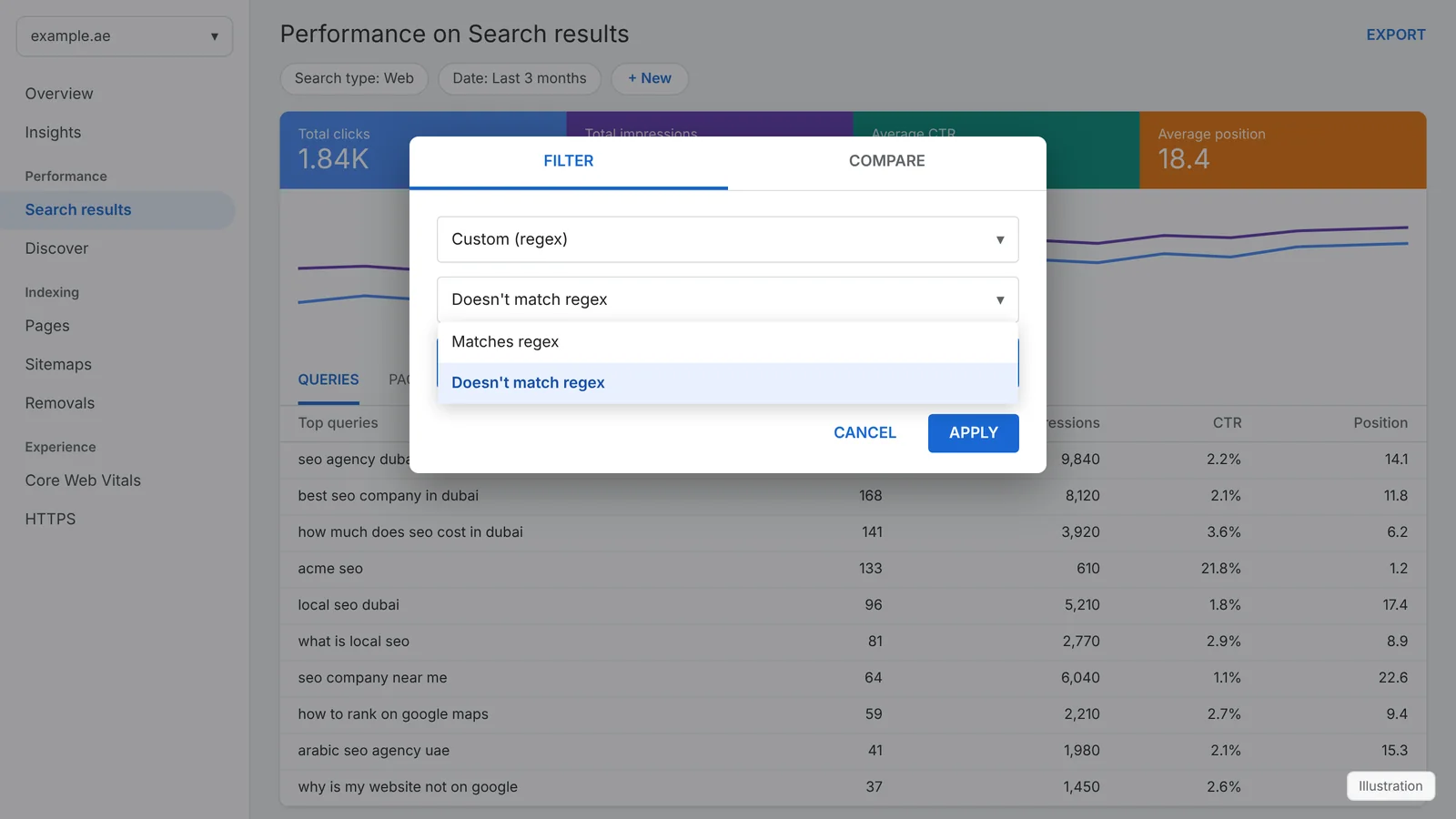
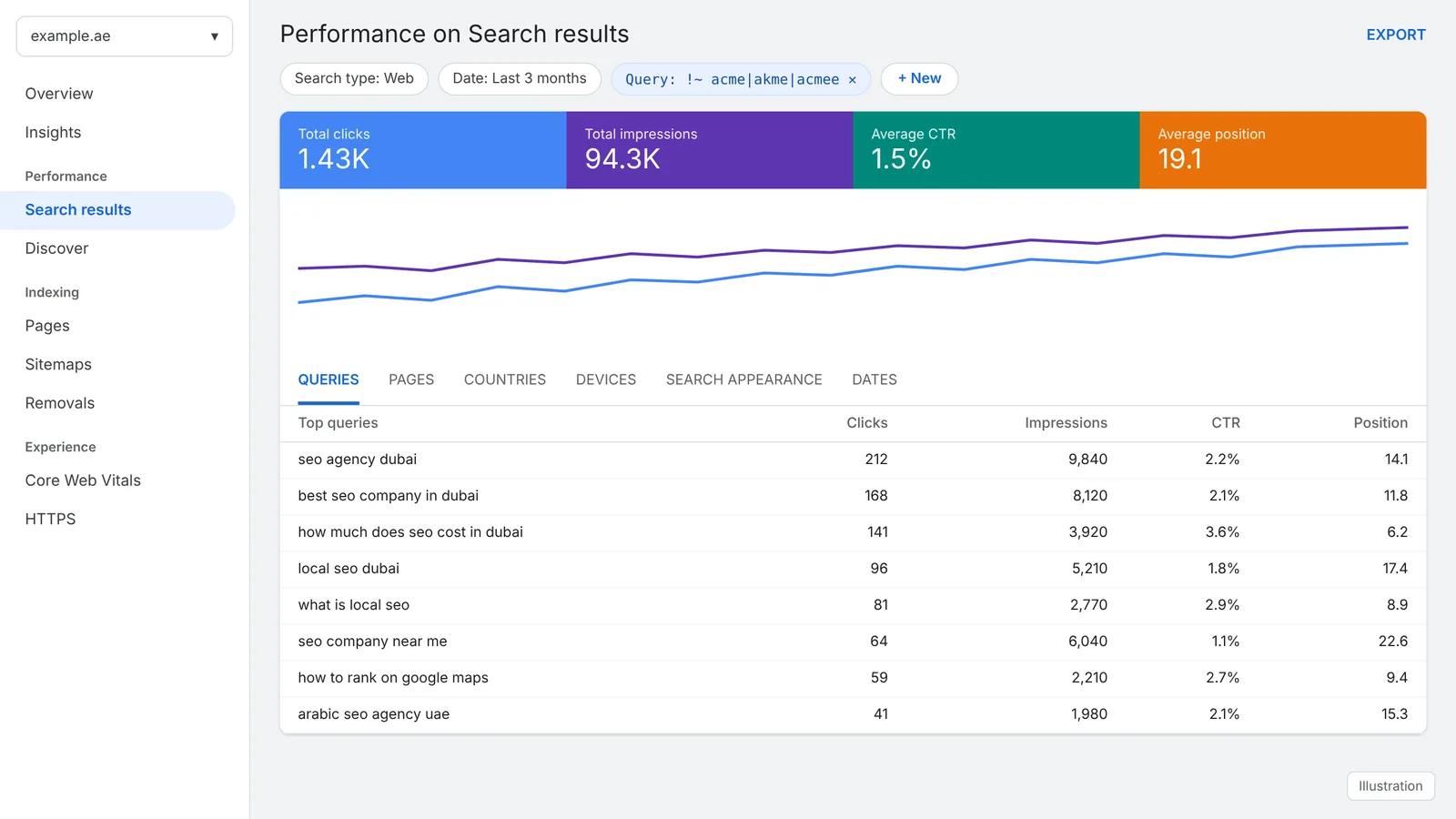
Common exclusions:
- Brand and misspellings:
acme|akme|acmee - Job seekers:
\b(jobs?|careers?|salary|internship|vacanc) - Free and DIY traffic:
\b(free|diy|template|tutorial)\b - Everything outside the blog (Page filter):
/blog/
Compare segments with regex in compare mode
The filter dialog has a Compare tab. Since April 2021, compare mode supports regex for Query and Page, which is the quickest way to put two segments side by side: branded against non-branded, blog against service pages, or Dubai against Abu Dhabi.
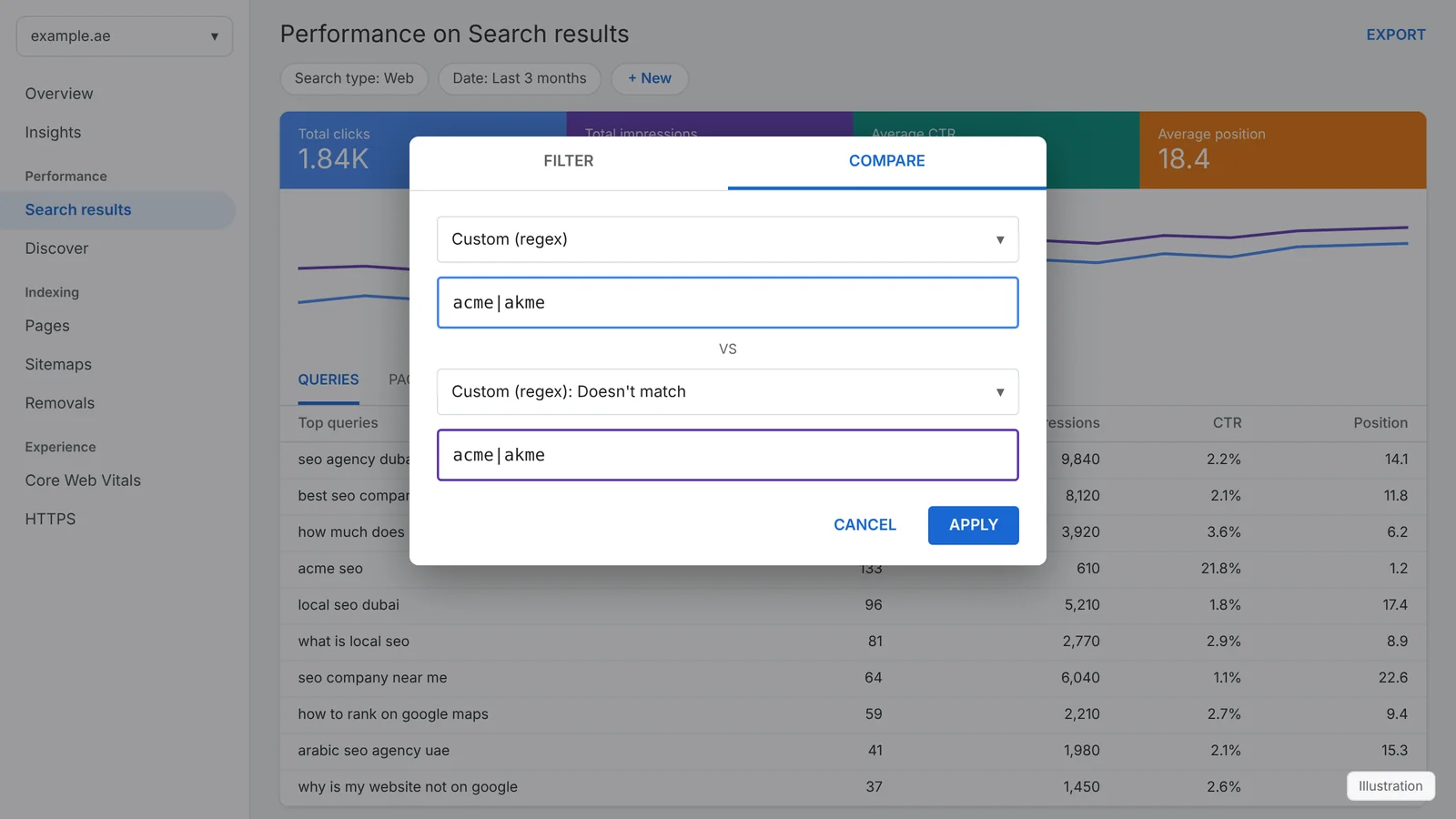
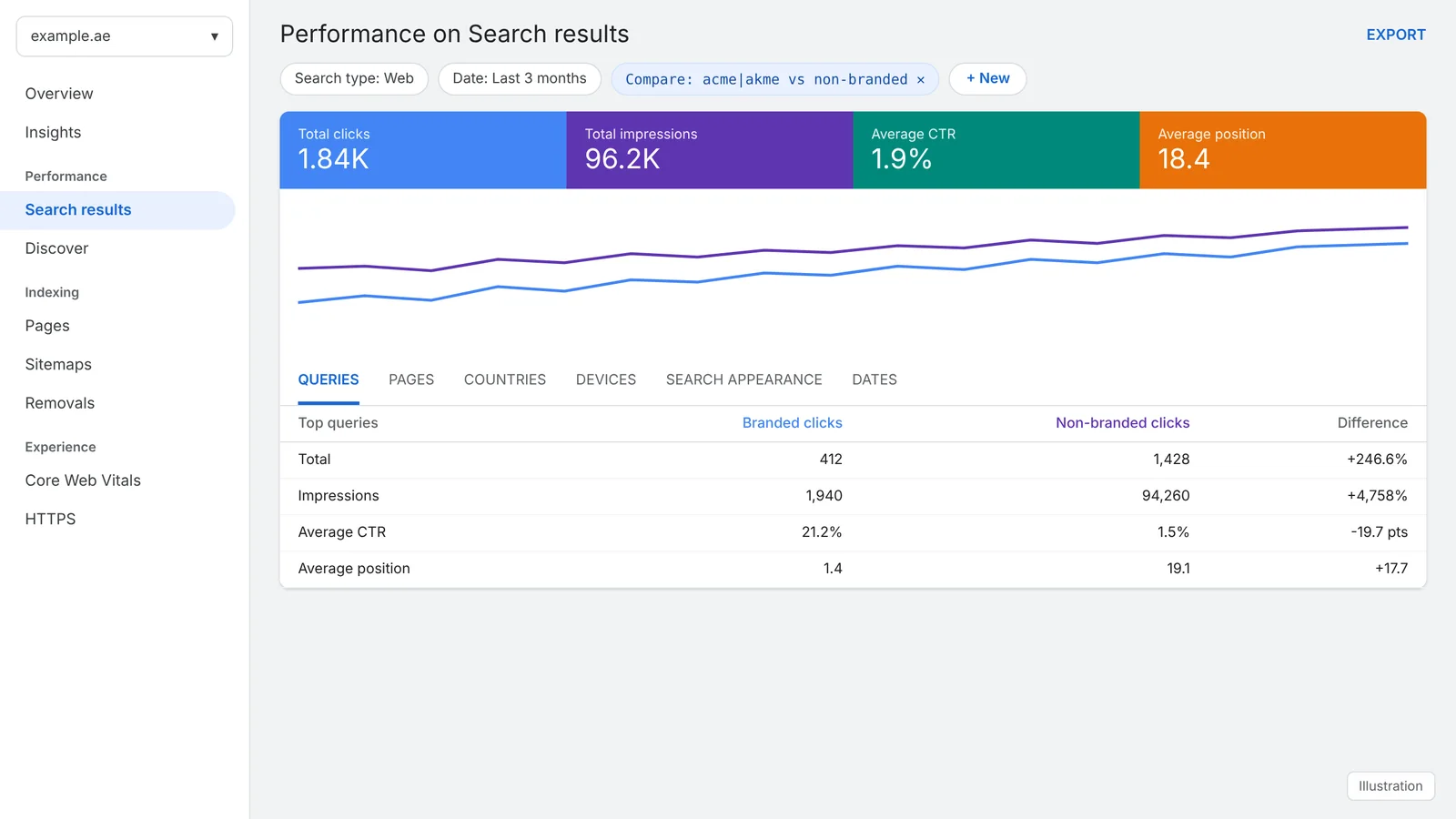
Useful comparisons:
- Blog against services (Page):
/blog/against/services/ - Two cities (Query):
\bdubai\bagainst\babu ?dhabi\b - Questions against everything else (Query):
^(who|what|when|where|why|how|which)\bmatches against doesn't match
Combine filters for AND logic
RE2 cannot say "contains seo AND contains dubai in any order" with lookaheads. You have two reliable options:
- Stack two filters. Add one Query filter
\bseo\band a second Query filter\bdubai\b. Search Console applies both. - List both orders in one pattern.
seo.*dubai|dubai.*seomatches the words in either order.
Stacking also lets you mix a positive and a negative rule, for example question queries (^(how|what|why|which)\b, Matches) that are not branded (acme, Doesn't match).
Seven SEO workflows that use regex
1. Find striking-distance keywords
Filter commercial queries with \b(best|top|price|cost|agency|company|services)\b, sort by position and look for terms ranking 8 to 20. These are the quickest wins for on-page optimisation and internal linking.
2. Spot keyword cannibalisation
Filter one query cluster, for example local seo, then open the Pages tab. If several URLs share impressions for the same intent, merge or differentiate them and set a clear canonical.
3. Build FAQ and AEO content
Filter question queries with ^(who|what|when|where|why|how|which|is|can|does)\b and look for high impressions with low CTR. Answer each one in a clear, quotable paragraph and add FAQPage structured data where it fits.
4. Track GEO and AI-style queries
Long conversational queries (^(\S+\s){9,}\S+$) and prompt-style queries (my location is|^(can you|help me|i need)\b) show how AI assistants and AI Mode send searches to Google on behalf of users.
5. Measure local SEO by area
Group city and district names, for example \b(deira|business bay|marina|jlt|jumeirah)\b, to see which areas bring impressions and which need their own landing page or Google Business Profile work.
6. Clean up indexing problems
Page filters such as [?&](utm_|gclid|fbclid), ^http:// and /(tag|author|feed)/ reveal URLs that should be canonicalised, redirected or set to noindex. Confirm each one in the URL Inspection tool.
7. Report non-branded growth
Save a non-branded view (Doesn't match acme|akme) and compare it month on month. It is the most honest measure of what SEO is adding beyond people who already know your name.
What we found testing these patterns on real Search Console data
To check the patterns behave the way this guide says, we ran them against a real export of our own Search Console data: the top 1,000 queries for topseoagency.ae over three months. The table shows the share of queries and impressions each segment captured.
| Segment | Regex | Share of queries | Share of impressions | Top match |
|---|---|---|---|---|
| Brand (top seo agency, any spacing) | top ?seo ?agency|topseoagency | 1.1% | 2.6% | top seo agency in dubai |
| Question words at start | ^(who|what|when|where|why|how|which|is|are|can|does|do|should)\b | 0.4% | 0.0% | what's the best seo agency for e-commerce |
| Commercial: best/top/leading | \b(best|top|leading|recommended|trusted|rated)\b | 22.1% | 32.4% | best seo agency in dubai |
| Price and budget | \b(price|prices|pricing|cost|costs|package|packages|cheap|affordable|budget)\b | 2.6% | 0.6% | affordable seo services |
| "Near me" | \b(near me|nearby|near by)\b | 2.4% | 2.7% | seo agency near me |
| Any UAE location | \b(dubai|abu dhabi|sharjah|ajman|ras al khaimah|rak|fujairah|umm al quwain|uae|emirates)\b | 52.4% | 73.1% | seo agency dubai |
| No location at all | \b(dubai|abu dhabi|sharjah|ajman|ras al khaimah|rak|fujairah|umm al quwain|uae|emirates)\b (Doesn't match) | 47.6% | 26.9% | seo agency |
| Abu Dhabi | \babu ?dhabi\b | 4.1% | 5.8% | seo agency abu dhabi |
| Sharjah | \bsharjah\b | 3.6% | 3.8% | seo company in sharjah |
| Arabic script | \p{Arabic} | 0.1% | 0.0% | local seo دبي |
| Arabic SEO (English query) | \barabic\b | 1.6% | 2.2% | arabic seo agency uae |
| Long-tail (5+ words) | ^(\S+\s){4,}\S+$ | 29.7% | 27.2% | best seo agency in dubai |
| 1 to 2 words | ^\S+(\s\S+)?$ | 7.2% | 10.2% | seo agency |
Three findings worth acting on:
- Location is the main signal. Queries naming a UAE location took the large majority of impressions. Searches with no location at all are a separate audience, and they usually need broader, national pages.
- Commercial modifiers dominate. Queries containing "best", "top" or "leading" carried about a third of impressions. Those pages need comparison-ready content, clear pricing and proof.
- AI prompts are already in the data. The prompt-style pattern surfaced 4 queries such as
how do i find an seo agency that can deliver fast results for my e-commerce site?. my location is united arab emirates.
These look like requests passed to Google by AI assistants: full sentences, a question mark followed by a full stop, and an explicit location. Filter for them in your own property. They show what AI users ask about your topic.
Regex vs the branded queries filter vs AI-powered configuration
Search Console now offers two newer ways to segment data. Regex still has its place alongside both.
| Feature | What it does | When to use regex instead |
|---|---|---|
| Branded queries filter | Announced in November 2025 and rolled out to all eligible properties on 11 March 2026. Uses AI to split queries into branded and non-branded automatically. | Your property is not eligible, you need exact control over misspellings and sub-brands, or you want to segment competitors' brand names. |
| AI-powered configuration | Introduced in December 2025 and available to everyone since February 2026. Describe the report you want in plain language and Search Console sets filters, comparisons and metrics. | The AI can misread a request, and you need a precise, repeatable pattern you can document, share and reuse in Looker Studio or the API. |
| Regex filters | Exact pattern matching on Query and Page, with Matches and Doesn't match options and compare mode support. | Use it whenever precision matters. |
Common regex mistakes and how to fix them
| Symptom | Likely cause | Fix |
|---|---|---|
| Zero rows, no error | Invalid syntax such as a lookahead, a backreference or an unclosed bracket | Test the pattern in a tool set to RE2 (see below) and remove unsupported features |
| Far too many matches | No anchors, or a short word matching inside longer words | Add ^, $ or \b: \bseo\b stops "seoul" matching |
| Page filter misses URLs | The pattern assumes a path but Search Console matches the full URL | Remember the protocol and domain: ^https://example\.ae/blog/ |
| Dots match anything | . is a wildcard | Escape it: example\.ae, \.pdf$ |
| Brand filter misses some searches | Spacing, misspellings or Arabic spellings not covered | List variants: acme|akme|ac me|أكمي |
| Totals differ from the unfiltered report | Anonymised queries are excluded once you filter by query | Expected behaviour. Google omits rare queries to protect user privacy, so query-filtered totals are lower |
| Only 1,000 rows visible | The interface table and export show the top rows only | Use the Search Console API, Looker Studio or the BigQuery bulk export for full datasets |
How to test a regex before using it
- regex101.com: choose the Golang flavour, which follows RE2 syntax. Paste a few queries or URLs as test strings and check what lights up.
- Google Sheets: export your queries, then use
=REGEXMATCH(A2, "your pattern"). Sheets uses RE2, so a pattern that works there works in Search Console. - Looker Studio and the API: Looker Studio's
REGEXP_MATCHand the Search Console API's regex filter operators use the same syntax. Patterns you build here can drive dashboards and automated reports. - Start small: apply the simplest version of a pattern first, confirm it returns rows, then add alternatives one at a time.
SEO terms used in this guide
- Query
- The exact words a user typed into Google that led to an impression of your page.
- Impressions
- How many times a link to your site appeared in search results.
- Clicks
- How many times users clicked through to your site from search results.
- CTR (click-through rate)
- Clicks divided by impressions. Low CTR at a good position usually means the title or snippet needs work.
- Average position
- The average topmost position your site held in results for a query or page.
- Branded vs non-branded
- Branded queries contain your company name; non-branded queries do not and measure discovery.
- Search intent
- What the searcher wants: information, a comparison, a purchase, a location or a specific site.
- Long-tail keywords
- Longer, more specific queries with lower volume and usually higher conversion rates.
- Striking distance
- Keywords ranking just outside the top results, often positions 8 to 20, where small improvements pay off.
- Keyword cannibalisation
- Two or more of your pages competing for the same query and intent.
- Canonical URL
- The preferred version of a page you want Google to index when duplicates exist.
- Anonymised queries
- Rare queries Google withholds from reports to protect user privacy.
- Featured snippet
- A highlighted answer at the top of results, often linked with a
#:~:text=fragment. - AI Overviews and AI Mode
- Google's AI-generated answers in search, which cite and link to source pages.
- GEO and AEO
- Generative Engine Optimisation and Answer Engine Optimisation: making content easy for AI systems and answer boxes to quote.
- E-E-A-T
- Experience, Expertise, Authoritativeness and Trustworthiness, Google's framework for judging content quality.
- Hreflang
- Markup that tells Google which language or regional version of a page to show, for example English and Arabic.
- RE2
- Google's open-source regular expression library, used by Search Console, GA4, Looker Studio and Sheets.
For more definitions, see our SEO glossary.
Sources
- Google Search Central: Better data filtering and comparison in Search Console (April 2021)
- Search Engine Land: Search Console regex filter adds negative matching option (June 2021)
- RE2 syntax reference (Google, GitHub)
- Google Search Central: Branded queries filter in Search Console (November 2025)
- Google Search Central: AI-powered configuration in Search Console (December 2025)